Clean Messy CRM Sheets, Dedupe Fuzzy Rows & Consolidate Data in Seconds
CleanSheet runs fuzzy Jaro-Winkler deduplication, duplicate row consolidation (Join & Math), smart
name splitting, 9 column cleaners, and GPT AI normalization right inside your browser—requiring only
spreadsheets.currentonly.
Everything Legacy Sheet Cleaners Do — Plus What They Miss
Designed for RevOps, sales ops, and analysts who need non-destructive CRM cleaning without granting read/write access to their entire Google Drive.
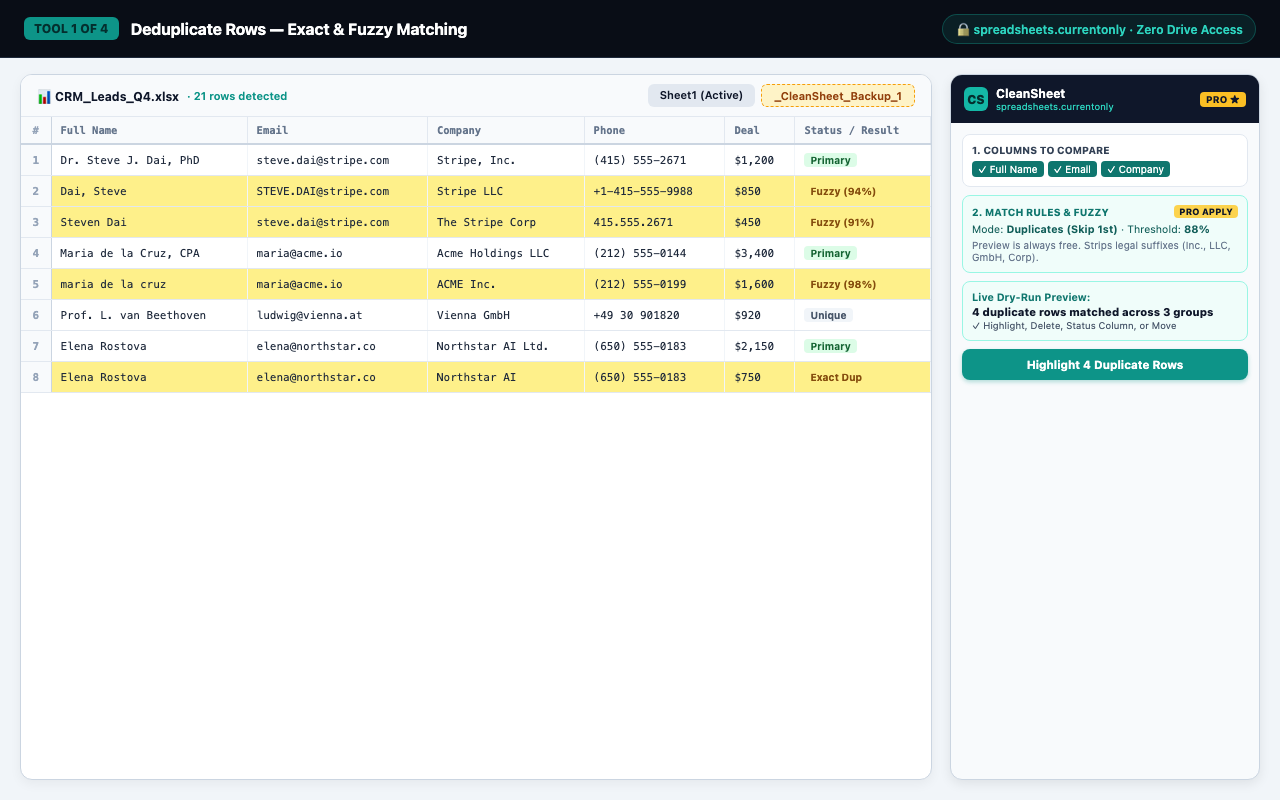
1. Exact & Fuzzy Deduplicate Rows
4 modes (Duplicates (Skip 1st), All Dupes (Incl. 1st), Unique Rows Only, 1st + Unique) with Jaro-Winkler
similarity (80%–96%) and automatic 30+ legal suffix stripping (Stripe, Inc. =
Stripe LLC).
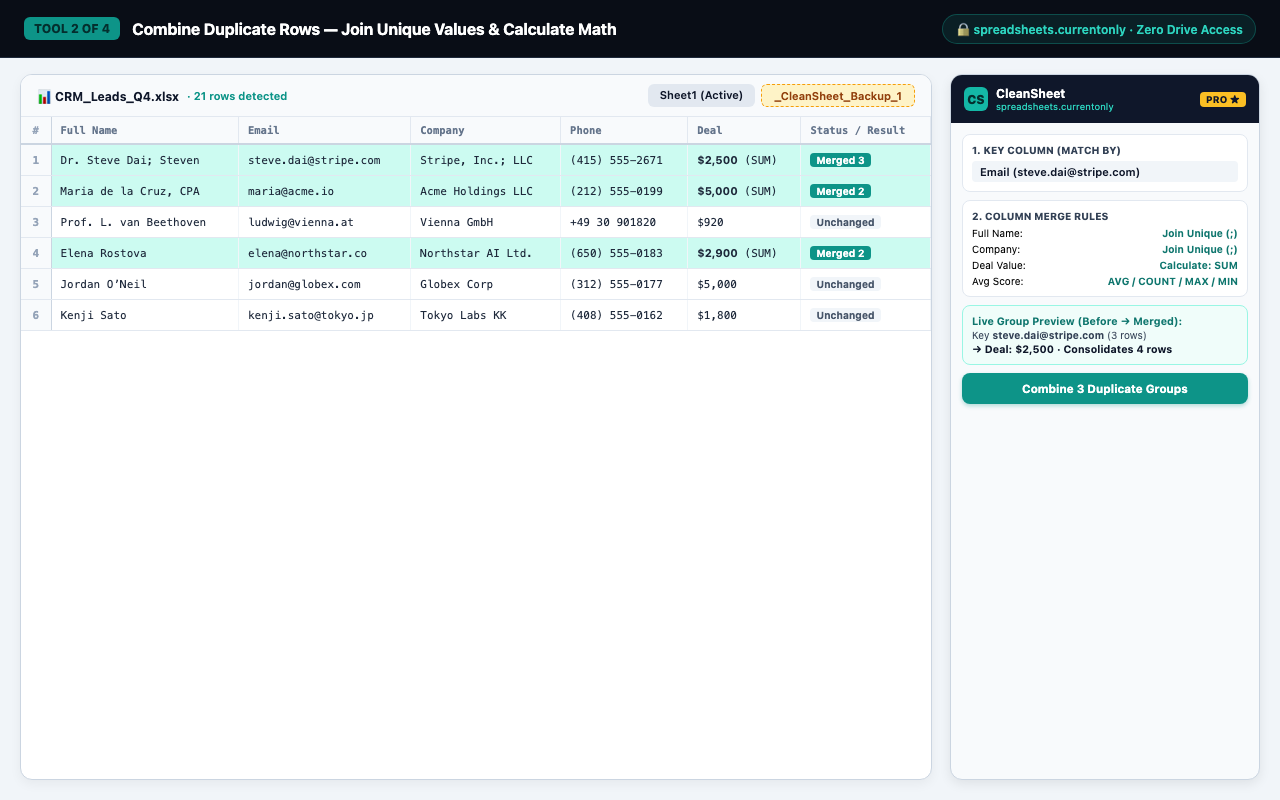
2. Combine Duplicate Rows (Join & Math)
Consolidate duplicate records into one row with live Before → Merged group preview: join unique values with custom delimiters or calculate SUM, AVERAGE, COUNT, MAX, and MIN.
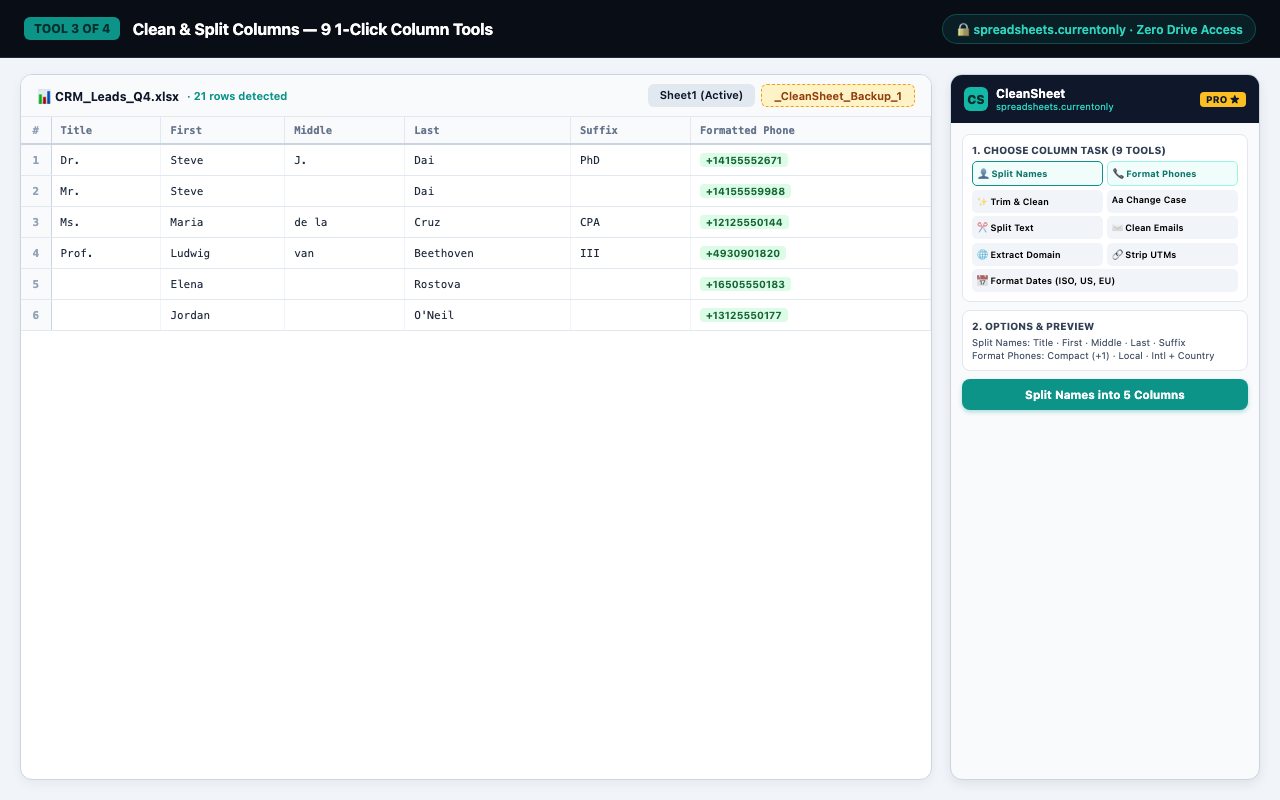
3. Smart Human Name Splitting
Handles inverted commas (Dai, Steve), salutations (Dr., Prof.),
nobiliary particles (de la Cruz, van Beethoven), and credentials
(PhD, CPA, III).
4. 9 1-Click Column Hygiene Tools
Format phones (Compact +1415..., Local (415)..., Intl +1 415...),
clean <mailto:...> emails, extract domains, strip utm_* /
gclid / fbclid params, split delimited text, change case, format dates, and trim
noise.
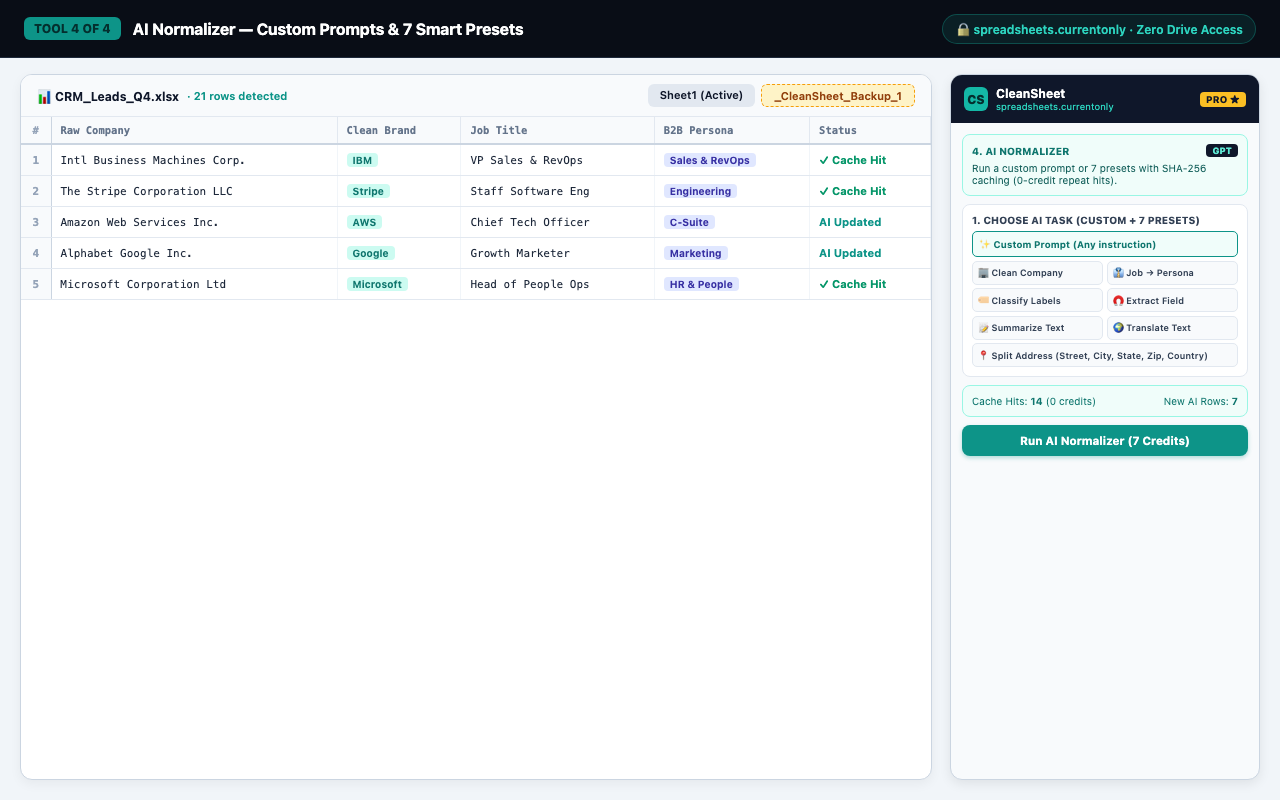
5. AI Normalizer (Custom Prompt & 7 Presets)
Run any row-by-row custom GPT prompt or 7 built-in presets (Clean Company, Job → Persona, Classify, Extract, Summarize, Translate, Split Address) backed by SHA-256 caching (0 credits on repeat cache hits).
6. Dry-Run Preview & 1-Click Undo
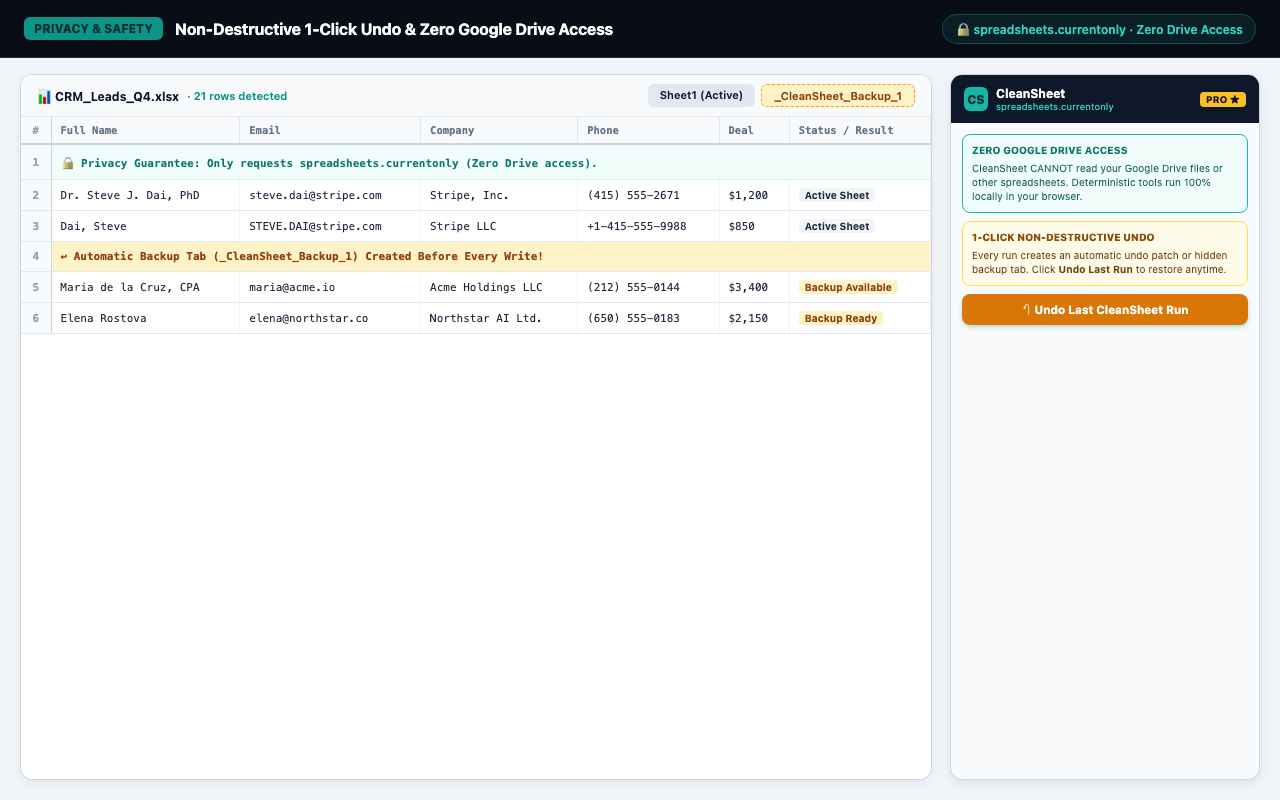
Inspect exact duplicate clusters or before/after changes prior to writing a cell, and restore in 1 click from an automatic undo patch or hidden backup tab inside the same workbook.
Workflow Screenshots
Built for the 300px Google Sheets sidebar with zero horizontal scrolling.
CleanSheet vs. Legacy Add-Ons
Why modern teams choose CleanSheet over traditional spreadsheet tools.
| Capability | Traditional Sheet Cleaners & Add-Ons | CleanSheet |
|---|---|---|
| OAuth Scope Required | Full spreadsheets + drive |
spreadsheets.currentonly only (Zero Drive access) |
| Dry-Run Preview Before Writing | No (mutates sheet immediately) | Yes — live Dry-Run Match & Before/After Inspector |
| 1-Click Non-Destructive Undo | Optional manual backup copy | Automatic undo patch / hidden backup tab + 1-Click Restore |
| Fuzzy Deduplication (Typos & Inc./LLC) | Separate character-count tool | Built-in Jaro-Winkler + 30+ legal suffix canonicalizer |
| Combine Duplicate Rows (Join & Math) | Basic merge without live group preview | Join Unique Values + SUM, AVERAGE, COUNT, MAX & MIN + Live Preview |
| Multi-Account Sign-In Reliability | Frequent blank sidebar when logged into multiple Gmail accounts | Server-injected HTML bootstrap (immune to /u/0/ bug) |
Simple, Coffee-Priced Plans
Unlimited Dry-Run Previews & up to 1,000 rows/run are 100% free forever. CleanSheet Pro starts at $5/month to unlock unlimited rows, Fuzzy Jaro-Winkler apply, & 15,000 AI rows/mo.
Free Tier — $0
Forever Free · No Credit Card Needed
- Unlimited Dry-Run Previews on any sheet size
- Clean up to 1,000 rows/run (Exact Dedupe, Combine Rows, All 9 Column Tools)
- 100 AI Normalizer row credits / month (cache hits cost 0)
- 1-Click Non-Destructive Undo
CleanSheet Pro — from $5/mo
Flexible Monthly / Annual / Lifetime Plans
- Unlimited rows per run + Fuzzy Jaro-Winkler apply
- Move or Copy duplicates to a new sheet tab & unlimited saved scenarios
- 15,000 AI Normalizer row credits / month
- Priority support & all Pro updates
Already subscribed? Manage Subscription
Frequently Asked Questions
Why does CleanSheet only ask for the spreadsheets.currentonly permission?
Does my spreadsheet data leave my browser?
How does 1-Click Undo work without Google Drive permissions?
_CleanSheet_Backup_...) inside the same spreadsheet. Clicking 1-Click Undo restores your
exact values and formatting and removes the temporary backup tab.